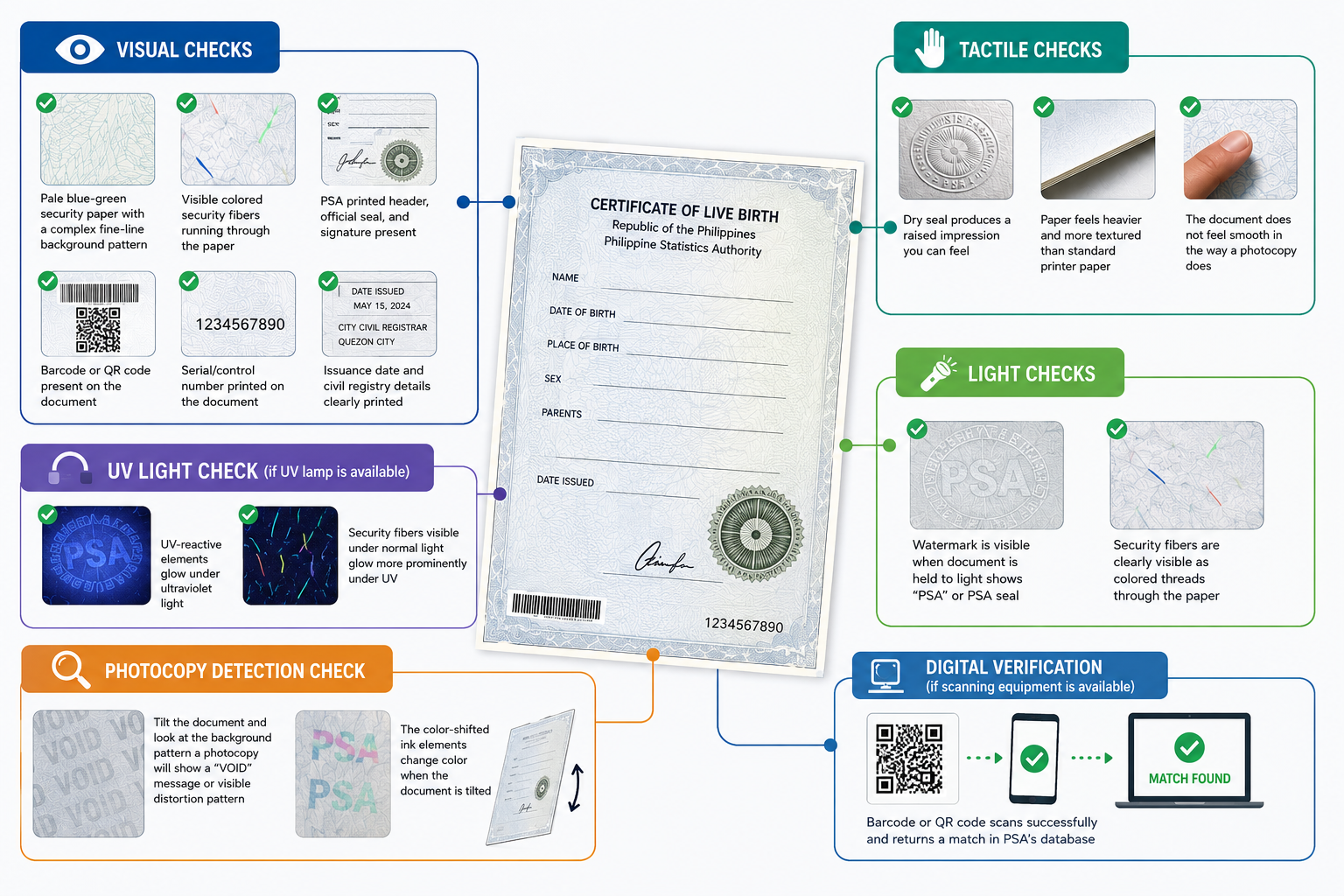
When you hold a PSA birth certificate in your hands, you are holding one of the most carefully protected documents the Philippine government produces. Its distinctive pale blue-green appearance, the faint patterns visible when you tilt it, the seal impression you can feel with your fingertips are not decorative choices. Every physical characteristic of an official PSA birth certificate is a deliberate security feature designed to make counterfeiting extremely difficult and unauthorized reproduction essentially impossible. Whether you ordered your birth certificate PSA online and are wondering if what arrived is the authentic version, or whether you are an HR officer, school registrar, or government employee tasked with verifying a document, understanding these features gives you the confidence to identify the real thing and spot a fake. This guide explains every security feature built into the Philippine Statistics Authority’s official birth certificate paper and printing process, how each feature works, and what to look for when verifying a document’s authenticity.
Why PSA Birth Certificates Have Security Features
Civil registry documents are among the most frequently forged government papers in the Philippines. Fraudulent birth certificates have historically been used for identity fraud, illegal adoption facilitation, academic credential misrepresentation, and immigration fraud. The PSA and its predecessor agency, the National Statistics Office (NSO), have continuously upgraded the security of civil registry documents in response to increasingly sophisticated forgery attempts. The current security paper officially called the PSA Security Paper or SECPA incorporates multiple layers of protection that operate at different levels of visibility: some features are visible to the naked eye, some require specific tools or lighting conditions to reveal, and some can only be verified through digital scanning. This multi-layered approach means that defeating all security features simultaneously would require access to specialized printing equipment, specific paper stock, and security inks that are tightly controlled and not commercially available.
See also: Why Quantum Technology Matters
Security Feature 1: The PSA Security Paper (SECPA)
The foundation of the document’s security is the paper itself. PSA birth certificates are not printed on ordinary paper they are printed on a specially manufactured security paper stock that has multiple built-in characteristics.
Watermark
When you hold the PSA birth certificate up to a light source, a window, a lamp, or a phone flashlight held behind the document you will see a watermark embedded in the paper itself. The watermark is not printed on the surface but is created during the paper manufacturing process by varying the thickness of the paper fiber at specific points. The PSA watermark typically shows the text “PSA” or the PSA seal embedded in the paper. Because the watermark is part of the paper’s physical structure, it cannot be photocopied, scanned and reprinted, or added to a sheet of regular paper after the fact. A document without a visible watermark when held to light is immediately suspect.
Security Fibers
Embedded within the paper stock are tiny colored fibers thin threads of red, blue, or other colors randomly distributed throughout the paper material. These fibers are visible on both the front and back of the document and appear to run through the paper rather than sitting on its surface. Security fibers cannot be reproduced by standard photocopying or printing. On a photocopy, the fibers either disappear entirely or appear as dark marks rather than the colored threads visible in the original. The irregular, random distribution of these fibers across each sheet also means that no two documents have exactly the same fiber pattern making individual document verification possible in theory.
Invisible (UV-Reactive) Fibers
In addition to the visible fibers, PSA security paper contains UV-reactive elements that are invisible under normal lighting conditions but glow brightly under ultraviolet light. These invisible features include UV-reactive fibers and, in some versions of the security paper, patterns or text visible only under UV light. UV light verification is commonly used by banks, embassies, and immigration counters equipped with UV verification lamps to instantly check whether a document is printed on genuine security paper.
Non-Photocopiable Background
The background pattern printed on PSA security paper is designed to produce a void or distorted pattern when photocopied or digitally reproduced. This technology, sometimes called pantograph security, embeds a hidden warning word or pattern that only becomes visible when the document is photocopied, scanned, or digitally reproduced. On a genuine PSA birth certificate, the background pattern appears as a continuous, regular design. On a photocopy of that document, a hidden word typically “VOID” appears across the reproduced image, immediately identifying it as a copy rather than an original.
Security Feature 2: PSA Official Dry Seal
Every genuine PSA birth certificate carries an embossed dry seal, a raised impression stamped into the paper by a mechanical seal press. The dry seal is the PSA official seal, and because it is embossed directly into the paper by a physical tool, it cannot be reproduced by any printing or photographic process. Run your fingertip across the area of the document where the seal appears. On a genuine PSA birth certificate, you will feel a distinctly raised impression that the outline of the seal’s design and text is physically raised from the paper surface. On a counterfeit or photocopied document, this tactile raised texture is absent; the surface feels flat regardless of what is printed on it. The dry seal is typically located at a specific position on the document, often near the official’s signature or at the bottom of the document. Its presence, combined with the tactile raised texture, is one of the most reliable quick-verification methods available without any specialized equipment.
Security Feature 3: PSA Official Signature
Genuine PSA birth certificates carry the printed signature of the Civil Registrar General or the authorized PSA official. In the context of centrally issued PSA copies on security paper, this signature is incorporated into the document during the secure printing process. This signature confirms that the document was issued through the official PSA production system. An unsigned document, or one with a signature that appears handwritten on top of the printed content rather than integrated into the printing, should be treated with suspicion and submitted for verification.
Security Feature 4: Barcode and QR Code
Modern PSA birth certificates include a barcode or QR code that digitally encodes specific information about the document. This code can be scanned to verify the document’s authenticity against PSA’s digital database. The barcode or QR code encodes information such as the document’s unique identifier, the date of issuance, and a verification hash that confirms the printed data matches what is on file in PSA’s civil registry database. Scanning the code with an authorized verification tool produces a result that confirms either that the document is authentic or that the code does not correspond to any valid PSA document. This digital verification layer is particularly valuable because it connects the physical document to the PSA database in real time making it possible to confirm not just that the paper looks genuine but that the specific document actually exists in the official system. Institutions and government agencies with access to PSA’s verification system can scan this code to instantly confirm a document’s authenticity. Even without access to the backend verification system, the presence of the code is an indicator of legitimacy fraudulent documents often omit the code entirely or use a code that does not scan correctly.
Security Feature 5: Printed Security Background Pattern
The background of a genuine PSA birth certificate features a complex, fine-line security pattern sometimes called guilloché, intricate geometric designs composed of very fine lines that would require specialized intaglio printing equipment to reproduce accurately. This pattern is printed in the pale blue-green color characteristic of PSA security paper. When examined closely, the pattern consists of incredibly fine, precise lines that create a continuous design across the document. Attempting to reproduce this pattern using standard laser or inkjet printing results in a noticeably degraded version; the fine lines either blur together or appear as uneven patches of color rather than the sharp, precise design of the original. The guilloché pattern also interacts with the other security features the watermark, the security fibers, and the void pantograph pattern in ways that make the overall document extremely difficult to reproduce convincingly in its entirety.
Security Feature 6: Serial Number and Document Control Number
Each PSA birth certificate on security paper is assigned a unique serial number and control number that identifies the specific sheet of security paper used and the specific print run. These numbers are recorded in PSA’s internal document control system and can be cross-referenced during verification. The presence of a serial number on the document is a baseline indicator of authentic PSA production. Fraudulent documents sometimes omit serial numbers, use sequential or obviously patterned numbers that do not correspond to any genuine PSA issuance, or reuse serial numbers from previously issued documents.
Security Feature 7: Color-Shifting Ink (In Some Versions)
More recent versions of PSA security paper incorporate color-shifting ink for certain printed elements, typically the official seal or specific text elements. Color-shifting ink appears to change color when viewed at different angles: for example, appearing blue when viewed straight on but shifting to green or gold when the document is tilted. This feature is commonly used in banknotes and high-security government documents. It cannot be reproduced by standard printing processes because achieving a genuine color shift requires specialized optically variable ink that is not commercially available and is tightly controlled by licensed manufacturers. If your PSA birth certificate includes this feature, tilt it under a light source and watch whether any printed elements shift color. If they do, it confirms the use of security ink. If an element that should shift color (based on comparison with a known genuine document) does not shift, this is a red flag.
Security Feature 8: Microprinting
Certain printed elements on PSA security paper include microprinting text that is printed at an extremely small size, often so small that it appears as a continuous line or decorative border when viewed with the naked eye. Under magnification, the line resolves into legible text typically repeating “PSA,” “Philippine Statistics Authority,” or similar authentication phrases. Microprinting is particularly effective as a security feature because it is extremely difficult to reproduce accurately at the correct scale using standard printing equipment. Photocopied or digitally reproduced versions of microprinted elements appear as a solid line or blurry texture rather than legible text, because standard reproduction equipment lacks the resolution required to capture and reproduce text at that scale. A jeweler’s loupe or strong magnifying glass reveals microprinting on a genuine PSA birth certificate. Attempting to read the same element on a suspected fake reveals the absence of legible text confirming the reproduction.
Security Feature 9: Issuance Date and Authenticity Information
Genuine PSA birth certificates include a clearly printed issuance date the date the security paper copy was generated and released by the PSA central system. This date is relevant for verifying recency requirements imposed by schools, embassies, and government agencies that require documents issued within a specified period. The issuance date also helps identify mismatched documents for example, a document purporting to be issued before the PSA security paper system existed, or a document with an issuance date that precedes the applicant’s own date of birth.
How to Verify a PSA Birth Certificate: A Practical Checklist
Whether you are the document owner checking your own received document, or an officer verifying a document submitted by an applicant, this checklist covers the key verification steps:
Visual checks (no tools required):
- PSA appointment Pale blue-green security paper with a complex fine-line background pattern
- PSA appointment Visible colored security fibers running through the paper
- PSA appointment PSA printed header, official seal, and signature present
- PSA appointment Barcode or QR code present on the document
- PSA appointment Serial/control number printed on the document
- PSA appointment Issuance date and civil registry details clearly printed
Tactile checks (feel with fingertips):
- PSA appointment Dry seal produces a raised impression you can feel
- PSA appointment Paper feels heavier and more textured than standard printer paper
- PSA appointment The document does not feel smooth in the way a photocopy does
Light checks (hold up to light or use phone flashlight):
- PSA appointment Watermark is visible when document is held to light shows “PSA” or PSA seal
- PSA appointment Security fibers are clearly visible as colored threads through the paper
UV light check (if UV lamp is available):
- PSA appointment UV-reactive elements glow under ultraviolet light
- PSA appointment Security fibers visible under normal light glow more prominently under UV
Photocopy detection check:
- PSA appointment Tilt the document and look at the background pattern a photocopy will show a “VOID” message or visible distortion pattern
- PSA appointment The color-shifted ink elements change color when the document is tilted
Digital verification (if scanning equipment is available):
- PSA appointment Barcode or QR code scans successfully and returns a match in PSA’s database
Indicators That a PSA Birth Certificate May Be Fraudulent
The absence or failure of any of the above verification points is grounds for concern. Specific red flags that indicate a potentially fraudulent document include:
- Plain white paper instead of the characteristic pale blue-green security paper
- No visible watermark when held to light
- No colored security fibers visible in the paper
- Background pattern that appears as flat color rather than the complex guilloché design
- No dry seal, or a flat printed version of a seal instead of a raised embossed impression
- No barcode or QR code, or a code that does not scan correctly
- Issuance date that predates the PSA security paper system
- Font sizes, spacing, or layout that differs visibly from known genuine PSA birth certificates
- The document feels smooth and lightweight like photocopier paper rather than the heavier security paper stock
- When photocopied, the background pattern does not reveal a void or warning pattern
- A visible “COPY” or “VOID” watermark on the document itself indicating you have been given a photocopy rather than an original
What to Do If You Suspect a Fraudulent PSA Document
If you are an institution or officer who has received a PSA birth certificate that fails the verification checks above, do not return the document to the submitter. Instead:
- Retain the document and document the specific features that failed verification
- Contact the PSA Civil Registry System through official channels to report the suspected fraudulent document and request verification assistance
- Contact the Philippine Statistics Authority’s main office or regional office for guidance on formal verification procedures
- If criminal fraud is suspected, coordinate with the National Bureau of Investigation (NBI) or the Philippine National Police (PNP) through standard reporting channels
For individuals who believe they have received a fraudulent PSA birth certificate for example, a document ordered through PSA appointment that appears different from the genuine article contact PSA appointment customer support immediately and provide photographs of the document for assessment.
Frequently Asked Questions
Does a PSA birth certificate expire?
The document itself does not expire. However, many institutions, schools, embassies, and government agencies require a copy issued within a specified recent period, typically six to twelve months. The security features do not degrade over time, but the recency requirement means you may need a fresh copy for certain transactions even if an older copy is genuine.
Can a genuine PSA birth certificate be photocopied for everyday use?
Yes, photocopies of a genuine PSA birth certificate are widely accepted for many everyday transactions where only identity verification is needed. The photocopy is not, however, accepted as a substitute for an original in transactions that require an official PSA document school enrollment that requires an original, passport applications, DFA Apostille processing, and similar official submissions all require the original SECPA document.
What is the difference between the old NSO birth certificate and a PSA birth certificate? The NSO (National Statistics Office) was renamed the Philippine Statistics Authority in 2013. Birth certificates issued by NSO before the PSA name change are still valid, the security features are the same or equivalent, and the document remains legally recognized. When submitting for official transactions, the distinction between NSO and PSA branding does not matter; both are accepted.
Can a PSA birth certificate be verified online?
Yes. PSA birth certificates issued on security paper with a barcode or QR code can be verified digitally. Institutions with access to PSA’s verification system can scan the code to confirm that the document matches a record in PSA’s civil registry database. This digital verification is one of the most reliable authentication methods available.
What should I do if my PSA birth certificate arrived without a dry seal?
Contact PSA appointment customer support immediately at and provide photographs of the document. A genuine PSA birth certificate issued through the official system will always have an embossed dry seal. A document without a dry seal may indicate a processing error which PSA appointment can investigate and rectify or may indicate a fraudulent document.
Final Thoughts
The security features built into every PSA birth certificate represent a significant investment in document integrity and understanding them gives you the tools to verify any document quickly, confidently, and without specialized equipment in most cases. The combination of the watermark, colored security fibers, embossed dry seal, guilloché background, barcode, and non-photocopiable void pattern creates a document that is extremely difficult to counterfeit convincingly. For individuals who order their PSA birth certificates through official channels whether through PSA appointment or at a PSA Serbilis outlet the document that arrives is the genuine article, produced by PSA’s secure central printing system. The security features are your assurance of this authenticity, and knowing how to read them ensures you can verify that assurance with your own eyes, fingertips, and, when available, a simple light source.